Purchase frame
After browsing the catalog and selecting the frames you want to purchase, you can place an order for each frame by invoking the purchaseFrame operation.
Optional parameters
Reference
A string that can be used to identify tasks uniquely or group multiple tasks together for easier tracking. The reference parameter accepts UTF-8 characters but it has a limitation of 256 string length.
EULA
The end user license agreement (EULA) defines the terms of use for purchased SAR products, also defining how widely products can be distributed. For full details of the EULA, see the relevant terms of your contract.
The eula parameter can take one of the following string values:
| EULA | Description |
|---|---|
|
This EULA option should be selected by a governmental organization that has contracted directly with ICEYE or by a reseller that plans to share products with a governmental organization. Government End Users shall use Products, Derivatives and Documentation solely under Government EULA. |
|
This EULA option should be selected by a commercial organization that has contracted directly with ICEYE or by a reseller that plans to share products with a commercial organization. All other End Users than Government End Users shall use Products, Derivatives and Documentation solely under Standard EULA. |
Product types
The productTypes parameter is an optional array of SAR product types to request for this purchase.
When omitted, the frame is delivered with the default products configured on your contract for the frame’s imaging mode.
"productTypes": ["SLC-COG", "GRD-COG"]The purchase remains in the active status while the requested products are being generated.
During this time, listPurchaseProducts returns an empty data array.
Once the requested products are available, the purchase status transitions to closed; if the order cannot be fulfilled, it transitions to failed.
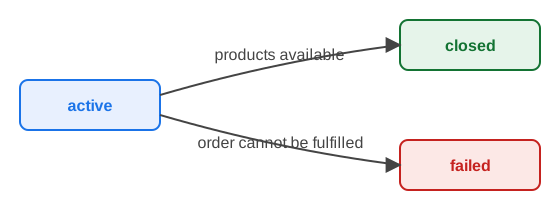
The active transition is one-way: an active purchase will eventually become either closed (the requested products are available) or failed (the order could not be fulfilled). See Purchase status for a description of each status.
See the SLA products table for the product types available per imaging mode.
Notifications
You can optionally use a webhook to receive a notification when the purchase reaches a terminal status — that is, when it becomes closed or failed. No notification is sent while the purchase is still active.
To use a webhook (which must already be registered with the Notifications API), provide the id of the registered webhook in the notifications parameter, as follows:
"notifications": {
  "webhook": {
    "id": "XXXXXX-XXXXXX-XXXXXX"
  }
}
When the purchase reaches a terminal state, the notification service sends a callback whose resourceKey is purchase, whose resourceID is the purchase ID, and whose data object carries the terminal status and the purchased itemIDs. For more details, see Notifications.
Each requested product type must be allowed both by your contract for the frame’s imaging mode and by the global platform configuration. If validation fails, the request is rejected with a 400 Bad Request — see Errors for details.
|
Example
Request
Enter the following curl command, remembering to replace the ${VARNAME} variables with the appropriate values:
curl --location "${API_BASE_URL}/api/catalog/v2/purchases" \
--header "Content-Type: application/json" \
--header "Accept: application/json, application/problem+json" \
--header "Authorization: Bearer ${API_ACCESS_TOKEN}" \
--data '{
    "contractID": "XXXXXXXX-XXXX-XXXX-XXXX-XXXXXXXXXXXX",
    "frameID": "XXXXXXXXXX",
    "reference": "customer task reference 123-456",
    "eula": "STANDARD",
    "productTypes": ["SLC-COG", "GRD-COG"],
    "notifications": {
        "webhook": {
            "id": "XXXXXX-XXXXXX-XXXXXX"
        }
    }
}'
Response
On success, returns a 200 status code and a JSON object containing the purchase ID and purchase status.
{
    "id": "XXXXXXXXXX",
    "frameID": "XXXXXXXXXX",
    "contractID": "XXXXXXXX-XXXX-XXXX-XXXX-XXXXXXXXXXXX",
    "createdAt": "2023-12-20T15:04:05Z07:00",
    "status": "active",
    "reference": "customer task reference 123-456",
    "eula": "STANDARD"
}
Errors
This section describes some common error conditions.
400 - bad request
When productTypes is provided, each requested product must be (a) granted to your contract, and (b) supported by the platform for the frame’s imaging mode. The following errors may occur:
| Status Code | Error Code | Description |
|---|---|---|
|
|
The requested product is not supported by the frame’s imaging mode. |
Example error response when a requested product is not allowed for the imaging mode:
{
    "title": "Bad request",
    "code": "bad_request",
    "details": "bad request: product VID is not supported for SPOTLIGHT imaging mode",
    "reference": "/api/catalog/v2/purchases"
}
For more details, see Error handling.
409 - conflict
A frame can be purchased only once. Re-purchasing the same acquisitionId and frameNumber returns 409 Conflict and no new purchase is created.
| Status Code | Error Code | Description |
|---|---|---|
|
|
The requested frame is already purchased. Use |
Example error response when the frame has already been purchased:
{
    "title": "Conflict",
    "code": "conflict",
    "details": "Frame is already purchased",
    "reference": "/api/catalog/v2/purchases"
}
For more details, see Error handling.