Off-center imaging
Learn how to use off-center imaging to get more imaging opportunities for a point of interest. It is most useful with imaging modes that have large scenes, such as Strip, Scan and Scan Wide.
What is off-center imaging?
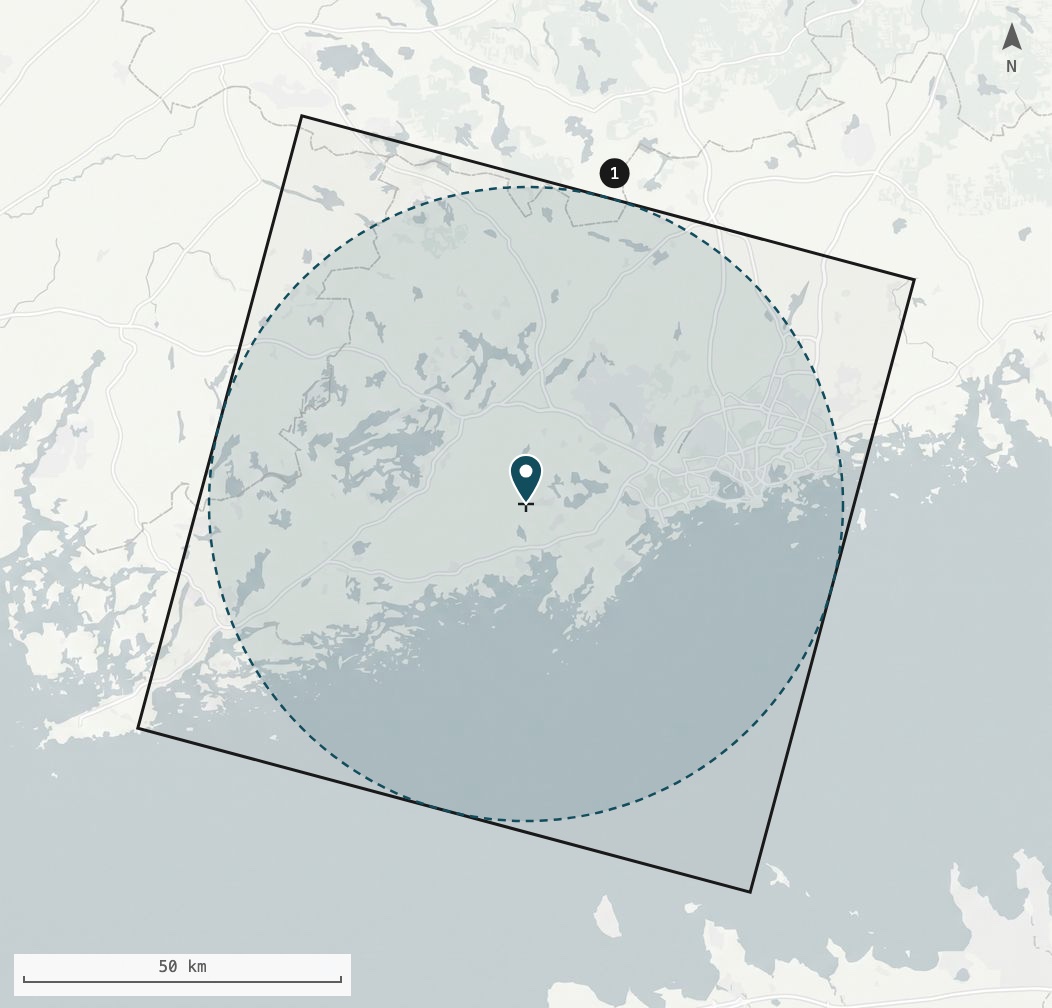
When you create a task, you provide coordinates for a point of interest. By default, that point becomes the center of the scene, so a satellite pass can only be used if it can point the scene center exactly at the provided coordinates.
Often you don’t need the point of interest at the exact center of the image, but need a certain area around the point to be covered.
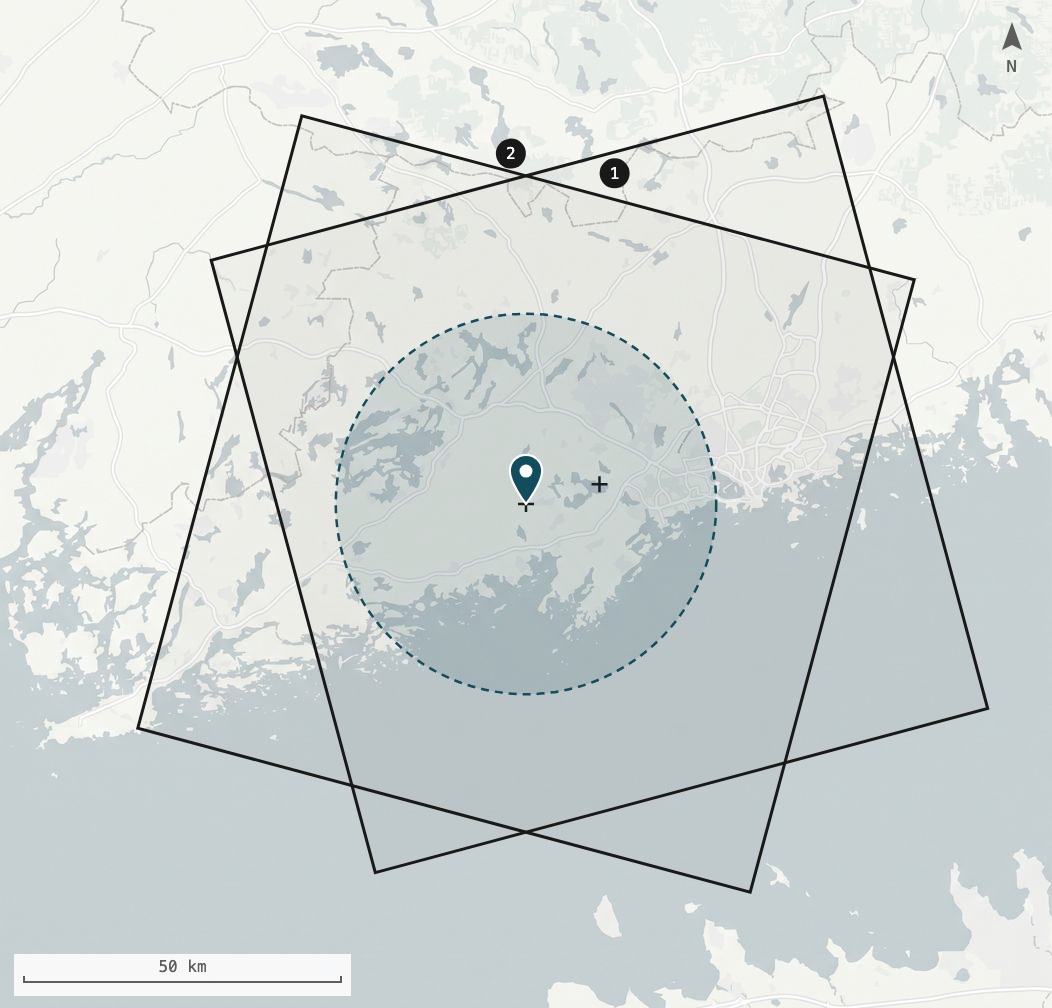
Off-center imaging lets you say how large that area is: the aoiRadiusMeters parameter and the point of interest together define an area of interest (AOI) circle.
Any scene that covers the whole circle is acceptable.
The scheduler can therefore shift the scene sideways from the point of interest and use passes that could not have centered on it, but do cover the whole AOI circle.
How it works
Off-center imaging is not a separate API.
It adds a single optional parameter, aoiRadiusMeters, to the existing tasking operations.
The rest of the workflow stays the same.
Note the following points about off-center imaging behavior:
-
Across-track shift only: the scheduler currently shifts the scene only across-track (perpendicular to the satellite’s flight path). Along-track, the scene stays centered on the point of interest, so the AOI circle can sit near the left or right edge of the scene, but not in a corner. Along-track shifting may be added in the future to provide even more opportunities.
-
Maximum shift: the scene center can move away from the point of interest by up to half of the scene width minus the radius. For a 100 km wide Scan scene and a 20 km (20,000 m) radius, that is up to 30 km to either side.
-
More opportunities: the smaller the radius, the further the scene can shift, and the more passes qualify.
-
All qualifying passes are equal: when
aoiRadiusMetersis supplied, any pass that fully covers the AOI circle is treated equally, regardless of how far off-center the point of interest lands. The scheduler does not favor a centered scene over a shifted one, so set the radius to the full area you need covered. -
Default: if you omit
aoiRadiusMeters, the scene is centered on the point of interest, which is the same as setting the maximum radius for the imaging mode.
Try it
Move the slider to change the AOI radius of a Scan task. As the radius shrinks, the scene can shift further and more passes can image the circle.
Illustrative passes, not real orbit data.
Radius limits
The radius is an integer number of meters, from 1 up to half of the scene width of the imaging mode.
For example, a Scan scene is 100 km wide, so its maximum radius is 50000.
The scene sizes of all imaging modes are listed in the Imaging Modes chapter of the ICEYE Product Specification.
The parameter appears in the following operations:
| Operation | Where aoiRadiusMeters appears |
|---|---|
Request body and response |
|
Each request item |
|
Response, when the task was created with a radius |
Part 1: Checking feasibility with an AOI radius
Before you create a task, you can check whether it can be scheduled with your chosen radius.
Add aoiRadiusMeters to every request item of the checkFeasibility operation that should use off-center imaging.
Request
-
cURL
-
Python
-
JavaScript
curl --location "${API_BASE_URL}/api/tasking/v2/feasibility" \
  --header "Content-Type: application/json" \
  --header "Accept: application/json, application/problem+json" \
  --header "Authorization: Bearer ${API_ACCESS_TOKEN}" \
  --data '[
    {
      "acquisitionWindow": {
        "start": "2026-11-02T00:00:00Z",
        "end": "2026-11-05T00:00:00Z"
      },
      "contractID": "XXXXXXXX-XXXX-XXXX-XXXX-XXXXXXXXXXXX",
      "imagingMode": "SCAN",
      "pointOfInterest": {
        "lat": 60.1699,
        "lon": 24.9384
      },
      "aoiRadiusMeters": 20000
    }
  ]'
import requests
feasibility_payload = [
{
"acquisitionWindow": {
"start": "2026-11-02T00:00:00Z",
"end": "2026-11-05T00:00:00Z"
},
"contractID": "XXXXXXXX-XXXX-XXXX-XXXX-XXXXXXXXXXXX",
"imagingMode": "SCAN",
"pointOfInterest": {
"lat": 60.1699,
"lon": 24.9384
},
"aoiRadiusMeters": 20000
}
]
response = requests.post(
f"{API_BASE_URL}/api/tasking/v2/feasibility",
headers={
"Content-Type": "application/json",
"Accept": "application/json, application/problem+json",
"Authorization": f"Bearer {access_token}"
},
json=feasibility_payload
)
for item in response.json()["feasibility"]:
print(f"Request {item['id']}: {item['result']}")const feasibilityPayload = [
{
acquisitionWindow: {
start: "2026-11-02T00:00:00Z",
end: "2026-11-05T00:00:00Z"
},
contractID: "XXXXXXXX-XXXX-XXXX-XXXX-XXXXXXXXXXXX",
imagingMode: "SCAN",
pointOfInterest: {
lat: 60.1699,
lon: 24.9384
},
aoiRadiusMeters: 20000
}
];
const response = await fetch(`${API_BASE_URL}/api/tasking/v2/feasibility`, {
method: "POST",
headers: {
"Content-Type": "application/json",
"Accept": "application/json, application/problem+json",
"Authorization": `Bearer ${accessToken}`
},
body: JSON.stringify(feasibilityPayload)
});
const result = await response.json();
result.feasibility.forEach(item => console.log(`Request ${item.id}: ${item.result}`));Response
On success, you receive a 200 status code with a result for each request item:
{
  "createdAt": "2026-10-19T09:30:00Z",
  "feasibility": [
    {
      "id": "0",
      "result": "FEASIBLE"
    }
  ],
  "id": "XXXXXXXX-XXXX-XXXX-XXXX-XXXXXXXXXXXX",
  "status": "DONE"
}
If an item comes back INFEASIBLE, try a smaller radius or a wider acquisition window and check again.
Part 2: Creating a task with an AOI radius
Creating a task with off-center imaging is identical to creating a regular task, with one addition: the aoiRadiusMeters field in the request body.
The aoiRadiusMeters parameter
Add it alongside your usual task parameters:
"aoiRadiusMeters": 20000
The radius must not exceed half of the scene width of the imaging mode (see Radius limits).
Larger values are rejected with a 400 status code and the error code ERR_INVALID_AOI_RADIUS.
|
Full request example
-
cURL
-
Python
-
JavaScript
curl --location "${API_BASE_URL}/api/tasking/v2/tasks" \
  --header "Content-Type: application/json" \
  --header "Accept: application/json, application/problem+json" \
  --header "Authorization: Bearer ${API_ACCESS_TOKEN}" \
  --data '{
    "acquisitionWindow": {
      "start": "2026-11-02T00:00:00Z",
      "end": "2026-11-05T00:00:00Z"
    },
    "contractID": "XXXXXXXX-XXXX-XXXX-XXXX-XXXXXXXXXXXX",
    "imagingMode": "SCAN",
    "pointOfInterest": {
      "lat": 60.1699,
      "lon": 24.9384
    },
    "aoiRadiusMeters": 20000
  }'
import requests
task_payload = {
"acquisitionWindow": {
"start": "2026-11-02T00:00:00Z",
"end": "2026-11-05T00:00:00Z"
},
"contractID": "XXXXXXXX-XXXX-XXXX-XXXX-XXXXXXXXXXXX",
"imagingMode": "SCAN",
"pointOfInterest": {
"lat": 60.1699,
"lon": 24.9384
},
"aoiRadiusMeters": 20000
}
response = requests.post(
f"{API_BASE_URL}/api/tasking/v2/tasks",
headers={
"Content-Type": "application/json",
"Accept": "application/json, application/problem+json",
"Authorization": f"Bearer {access_token}"
},
json=task_payload
)
task = response.json()
print(f"Task created: {task['id']}, status: {task['status']}")const taskPayload = {
acquisitionWindow: {
start: "2026-11-02T00:00:00Z",
end: "2026-11-05T00:00:00Z"
},
contractID: "XXXXXXXX-XXXX-XXXX-XXXX-XXXXXXXXXXXX",
imagingMode: "SCAN",
pointOfInterest: {
lat: 60.1699,
lon: 24.9384
},
aoiRadiusMeters: 20000
};
const response = await fetch(`${API_BASE_URL}/api/tasking/v2/tasks`, {
method: "POST",
headers: {
"Content-Type": "application/json",
"Accept": "application/json, application/problem+json",
"Authorization": `Bearer ${accessToken}`
},
body: JSON.stringify(taskPayload)
});
const task = await response.json();
console.log(`Task created: ${task.id}, status: ${task.status}`);Response
On success, you receive a 201 status code.
The response confirms the radius you requested:
{
  "id": "XXXXXXXX-XXXX-XXXX-XXXX-XXXXXXXXXXXX",
  "pointOfInterest": {
    "lat": 60.1699,
    "lon": 24.9384
  },
  "aoiRadiusMeters": 20000,
  "acquisitionWindow": {
    "start": "2026-11-02T00:00:00Z",
    "end": "2026-11-05T00:00:00Z"
  },
  "createdAt": "2026-10-19T09:30:00Z",
  "updatedAt": "2026-10-19T09:30:00Z",
  "imagingMode": "SCAN",
  "contractID": "XXXXXXXX-XXXX-XXXX-XXXX-XXXXXXXXXXXX",
  "status": "RECEIVED",
  "exclusivity": "PRIVATE",
  "priority": "COMMERCIAL",
  "sla": "SLA_8H",
  "eula": "STANDARD",
  "incidenceAngle": {
    "min": "PERFORMANT",
    "max": "FULL_RANGE"
  },
  "lookSide": "ANY",
  "passDirection": "ANY",
  "productTypes": ["GRD"]
}Constraints
Keep the following in mind when you use off-center imaging:
-
The incidence angle applies to the scene center: the task’s incidence angle range limits where the satellite can point the scene center, and the scheduler then checks whether a scene from that pointing covers the whole AOI circle. This means a point of interest up to about half a scene width outside the pointing range can still be imaged, but the point itself may then lie at an incidence angle outside the requested range.
-
Orbit changes can deschedule the task: if a later orbit change would move any part of the AOI circle outside the planned scene, that imaging opportunity is dropped and the task can be descheduled.
-
The radius has a maximum: a radius larger than half of the scene width is rejected with an error like this:
{
  "title": "Invalid parameter",
  "code": "ERR_INVALID_AOI_RADIUS",
  "details": "aoiRadiusMeters 60000 is out of range for imaging mode SCAN. The maximum allowed radius is half of the imaging mode's scene width.",
  "reference": "tasking/v2/specification#operation/createTask",
  "requestID": "XXXXXXXX-XXXX-XXXX-XXXX-XXXXXXXXXXXX",
  "timestamp": "2026-10-19T12:00:00Z"
}
If a request fails unexpectedly, see Reporting API Errors.